
Infrastructure Requirements
Introduction
This document aims to detail the infrastructure requirements necessary for the implementation and operation of the Hamsa Privacy system within a Kubernetes environment.
It serves as a technical guide for configuring essential components, ensuring that the architecture aligns with best practices for deployment, security, and connectivity.
The implementation of the system requires a specific set of hardware requirements, network configurations, and database integration. Furthermore, this document presents the necessary procedures for installation and connectivity testing, ensuring that communication between components occurs without interference.
This material is intended for infrastructure engineers, DevOps professionals, and systems administrators responsible for deploying and maintaining the solution. The following points are addressed to ensure an efficient and robust configuration:
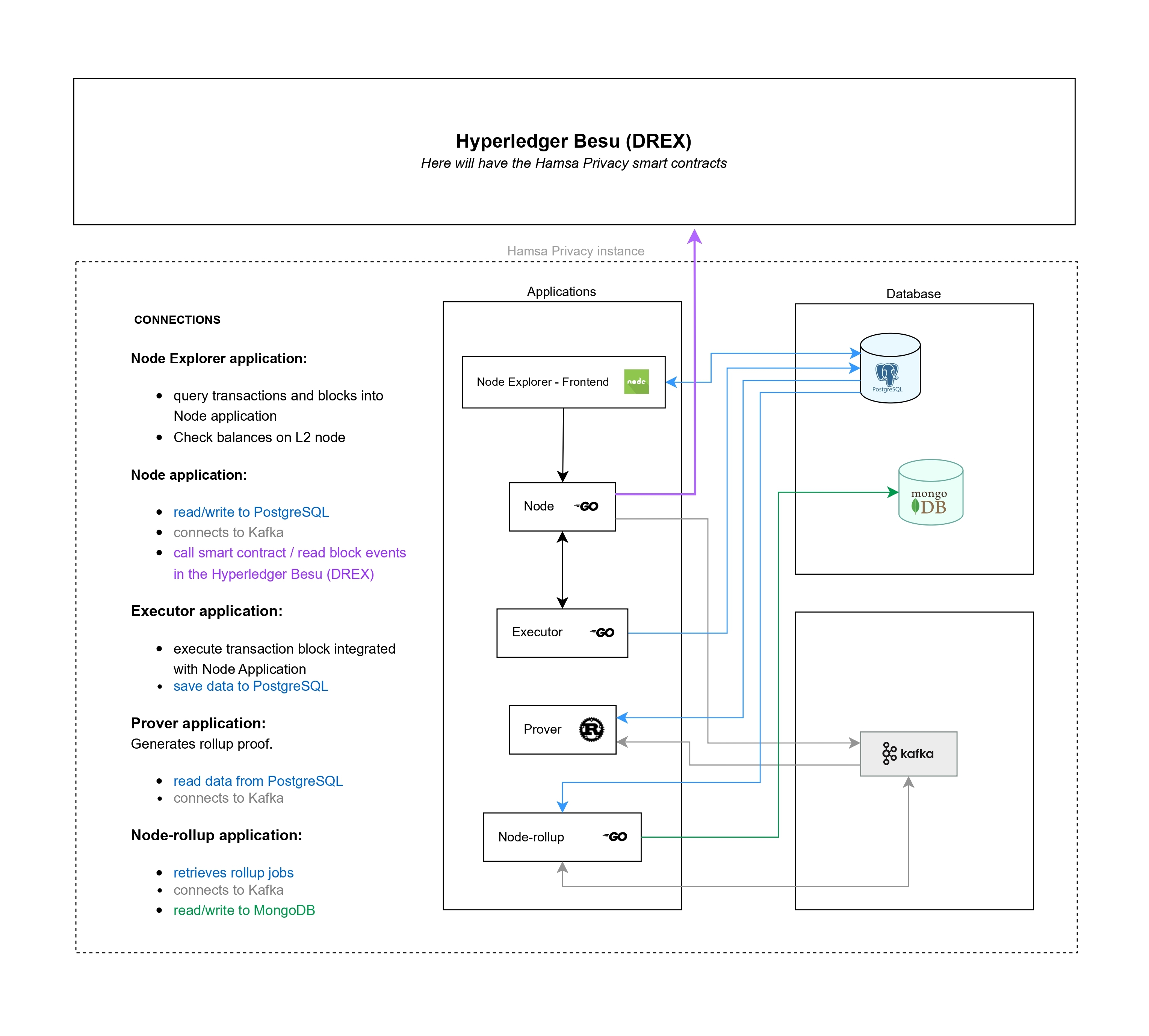
Besu Minimum Requirements
Minimum requirements for Hyperledger Besu
| Version | Minimum Gas Fee | Consenso | Gas fee limit | Minimum number of nodes in the network |
|---|---|---|---|---|
| 23.10.1 | 0 | Maximum possible (0x1fffffffffffff) | qbft | 4 nodes (requirement for Qbft consensus) |
Node Pools and Hardware Requirements
Minimum installation requirement for the solution in Kubernetes:
| Node Architecture | Operating System |
|---|---|
| amd64 | Linux (ideally (redhat/ubi9-minimal:9.2-717)) |
| Minimum vCPUs | Minimum RAM | Number of Replicas | Recommended Machine | Labels |
|---|---|---|---|---|
| 8 vCPUs | 16Gb (recommended 32Gb) | 2 (recommended 4) | Standard_D8s_v3 | purpose = "prover" |
| 8 vCPUs | 16Gb | 2 | Standard_D8s_v3 | purpose = "other" |
Please pay attention to the creation of labels as they are important, as the installation scripts use them to know which node to install each part of the application on.
Create a namespace with the following name:
node1
node2
node3
node4
browser
infra
Important - All resources must be available in the same region, for example: us-east
Databases
Databases are created within the same cluster using our installation scripts. The number of instances used will be as follows:
| Databases | Version | Number of Instances |
|---|---|---|
| MongoDB | 8 | 4 |
| Postgres | 14 | 4 |
Network Requirements
The following lists the main ports that must be open for communication between Besu nodes and the cluster:
| Portal | Protocol | Type |
|---|---|---|
| 30303 | TCP/UDP | P2P communication and discovery between nodes |
| 8545 | TCP | API RPC HTTP (interaction with contracts and transactions). |
| 8546 | TCP | WebSocket for notifications |
The Docker images used in the installation will be available in a dedicated container registry. Access to it must be enabled.
Container Register:
hamsaprivacyacrdev.azurecr.ioTools Required for Installation
A machine or VM with access to the Kubernetes cluster and Besu (for eventual troubleshooting) and the following tools installed:
- Azure CLI with access to created infrastructure
- curl or wget
- Docker
- kubectl (compatible with the version of the cluster nodes)
- Helm (compatible with Kubernetes)
- Helmfile
- Node version LTS
- Text editor (recommended VSCode)
- Access to Github
Connectivity Tests
To ensure that connectivity between all components is working correctly, perform the following connectivity tests.
! Important - The tests must be performed from a machine that has access to the provisioned infrastructure. We recommend performing the tests within the cluster where Hamsa Privacy will be installed. Testing from within the cluster can be done using the following image:
kubectl run debug-pod --rm -it --image=nicolaka/netshoot -- /bin/bashThis image contains all the necessary network tools to perform the tests below.
Test connectivity with Besu
curl -X POST \<http\://\<BESU\_NODE\_IP>>:\<PORT> \\\
-H "Content-Type: application/json" \\\
\--data '\{
"jsonrpc": "2.0",
"method": "eth\_getBlockByNumber",
"params": \["latest", true],
"id": 1
}'
Verify that the return contains the data of the last block of the network.
Relevant Information for Installation
- Chain ID configured in the Besu genesis.json file
- Namespace name created in Kubernetes, if you didn't use the suggested name in this document
- Names of labels created and associated with the cluster node, if you used names other than those suggested in this document
Useful Troubleshooting Commands
Kubernetes:
Set the default namespace, avoiding having to type the namespace name in future commands.
kubectl config set-context --current --namespace=node1Create aliases for frequently used commands:
alias k="kubectl"
alias klogs="kubectl logs -f"
alias kgp="kubectl get pods"
alias kdp="kubectl describe pod"
With the aliases created, some commands that will be very useful:
klogs <POD_NAME>
kdp <POD_NAME>
Wallets
We will need 3 wallets (public and private key) preferably with a balance in Layer 1.
Updated about 1 year ago